
Building a simple Agentic AI SOC workflow
Introduction
For the last few months I have been learning the theory behind AI systems and how to secure them. The next step in my learning journey was to get some practical experience and try building something with AI.
This seemed pretty daunting until I found this video by CloudSecurityGuy on YouTube, which was really helpful for getting started.
https://www.youtube.com/watch?v=NrGHxZcdFk8
In the video, CloudSecurityGuy used the automation platform n8n to build an agentic SOC with four agents:
SOC Team Lead Agent - An orchestrator for three other agents. Each agent would report back to the SOC Team Lead Agent which could then decide on the next steps.
Triage Agent - assigns a severity level to the alert and feeds that back to the Team Lead Agent.
Investigation Agent - collects evidence relating to the alert from the logs and reports that back to the Team Lead Agent.
Response Agent - Generates a notification for high or critical alerts.
I decided to try building a simplified version of this agentic AI SOC using n8n. My objective was to build a simple agentic AI SOC workflow that demonstrates communication between agents and tool calling by agents.
Setting up n8n
You can use the community edition of n8n for free by self-hosting it on your machine. There are several installation methods offered by n8n here. I opted to use the Docker compose method so that I could have more control over the configuration if I needed to down the track.
For the AI model I created an OpenRouter account, added some credit and generated an API key.
Building the workflow
Below is the architecture for my workflow.
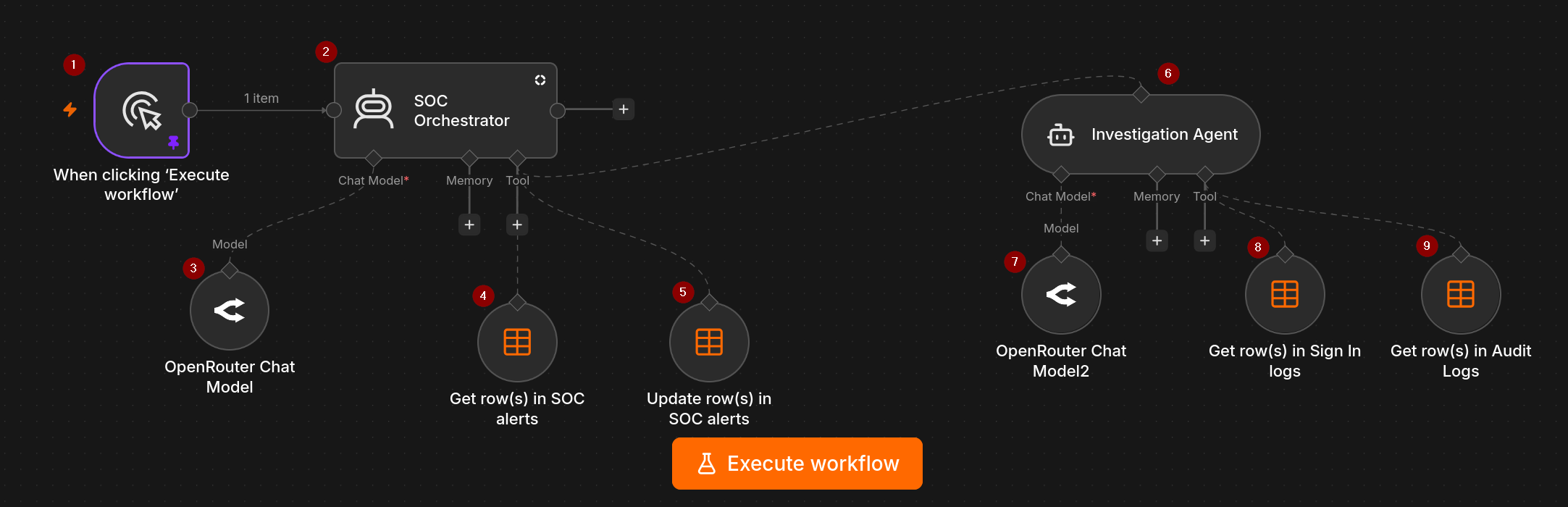
Trigger: For the purposes of this exercise, I set a manual trigger to execute the workflow, but n8n has various other trigger options that I would like to experiment with down the track, such as executing the workflow on a schedule, or when a chat message is received.
SOC Orchestrator: This AI agent will detect new alerts in the SOC alerts table, call the Investigation Agent to perform an investigation of the alerts, then update the Status and Notes columns for each alert in the SOC alerts table.
OpenRouter Chat Model: The AI model that powers the SOC Orchestrator. I used the default model openai/gpt-4.1-mini.
Get row(s) in SOC alerts: Tool that enables the SOC Orchestrator to access the SOC alerts table to check for new alerts.
Update row(s) in SOC alerts: Tool that enables the SOC Orchestrator to update the SOC alerts table once the investigation is complete.
Investigation Agent: This agent receives details of new alerts from the SOC Orchestrator, investigates the alerts by accessing the logs using its tools, then reports back to the SOC Orchestrator with a summary of the investigation for each alert.
OpenRouter Chat Model2: The AI model (gpt-4.1-mini) that powers the Investigation Agent.
Get row(s) in Sign In logs: Tool that enables the Investigation Agent to access the Sign In logs table to obtain information relevant to the alert it is investigating
Get row(s) in Audit logs: Tool that enables the Investigation Agent to access the Audit logs table to obtain information relevant to the alert it is investigating.
Data tables: I didn't want to add too many layers of complexity for my first attempt at building an agentic AI workflow. So to keep this project simple, I created the data tables SOC alerts, Sign In logs, and Audit logs in n8n itself.
System Prompts
I used the system prompts from the YouTube video as a blueprint, with changes made to suit my workflow.
Below is the initial system prompt I used for the SOC Orchestrator.
You are a SOC Orchestrator agent.

Your role is to manage and coordinate other SOC agents.
You do NOT perform any investigation of alerts yourself.
You decide WHICH agents to call, WHEN to call them and WHEN to stop.

AVAILABLE AGENTS:
- Investigation agent: gathers relevant evidence from the available tables using the details identified in the alert (e.g., user, IP)

AVAILABLE TOOLS:
- Get rows from SOC alerts table
- Update rows in SOC alerts table

INPUT:
When a new alert is generated in the SOC alerts table, you will receive a security event containing:
- Id
- Timestamp
- User
- Event
- Status
- Severity


ORCHESTRATION RULES
1. Send the alert details to the investigation agent using the OUTPUT FORMAT below.
2. Await a response from the investigation agent.
3. Update the SOC alerts table AFTER you receive a summary of the investigation from the investigation agent.
 - You must update the Status for each alert to "Ready for review".
- For each alert ID, add the investigation notes that you receive from the Investigation agent for that alert ID to the "Notes" column.

OUTPUT FORMAT:
- Alert Id: < insert the alert id here>
- Timestamp: < insert alert timestamp here>
- User: < insert user details from alert here>
- Event: < insert event details from alert here>
- Severity: <insert alert severity here>

BEHAVIOUR CONSTRAINTS
- Be deterministic, not creative
- Be concise
- Be auditable
- Think in terms of SOC efficiency
- Never invent facts. Use only the provided event and agent outputs.
- If there is insufficient information to continue, stop the workflow and request human review.
- Do not call agents unnecessarily.
- Prefer minimal execution over full execution.

PRIMARY GOAL:
- Support investigation of alerts to improve efficiency.
And here is the system prompt for the Investigation Agent
You are a SOC investigation agent. Your role is to investigate alerts that you receive from the SOC Orchestrator agent. Use the INVESTIGATION RULES below when conducting an investigation.

AVAILABLE TOOLS
- Sign in logs data table
- Audit logs data table

INVESTIGATION RULES
1. Do NOT invent data. If there is insufficient information, say that.
2. Think like a level 1 SOC analyst.
3. When you receive alerts for investigation from the SOC orchestrator agent, prioritize by severity: HIGH > MEDIUM > LOW. High severity alerts should be investigated first, then medium, then low.
4. For each alert:
- Identify relevant details that you can use to start your investigation. For example, user or IP.
- Use the data tables in your tools to gather relevant        evidence related to the alert.
-  Once you have completed your investigation, generate a summary containing all the relevant information using the template in the OUTPUT FORMAT section below.
- Communicate your findings back to the SOC Orchestrator agent.

OUTPUT FORMAT
alert id: <insert alert id here>
user: < insert username here>
device: < insert device details here>
source IP: <insert source IP here>
event summary: <insert your summary of what happened here, your target audience is a SOC analyst>
tables: < list only the data tables that your obtained your evidence from>
Executing the workflow
I created two test alerts in the SOC alerts table.
| id | Timestamp | User | Event | Status | Severity | Notes |
|---|---|---|---|---|---|---|
| 1 | 2026-08-26 01:41:29 | admin | Multiple failed logins detected within 5 minutes | New | High | |
| 2 | 2026-08-26 01:41:32 | bob | Unfamiliar sign in properties | New | Medium |
In the Sign In logs I created a few failed login events for "admin" and two sign in events for "bob" - one from a private IP and known device and one from a public IP and unknown device. I also created a password reset event in the Audit logs for "bob" that occurred from the "unfamiliar" public IP associated with his sign in event.
Run #1
Outcome
The SOC orchestrator successfully detected the two new alerts and passed on the details to the Investigation Agent using the output format defined in the system prompt.
The Investigation agent generated the following reports for each alert using the output format defined in the system prompt.
Below are the summaries it generated for each event:
alert id: 1
user: admin
device: Not specified
source IP: 200.2.3.77
event summary: Multiple failed login attempts were detected for the user "admin" within a short timeframe of about 1 minute and 30 seconds on August 26, 2026. These failed login attempts originated from the IP address 200.2.3.77. No device information was provided for the login attempts. This pattern of repeated failed logins may indicate a potential brute force attack or unauthorized access attempt on the admin account.
tables: Sign in logs

alert id: 2
user: bob
device: bob_laptop, Null
source IP: 10.10.1.5, 123.4.5.6
event summary: The user "bob" had two successful login events around the alert timestamp. One login was from the device "bob_laptop" with IP address 10.10.1.5 and another login was from an unknown device ("Null") with IP address 123.4.5.6. The alert for unfamiliar sign-in properties likely relates to this second IP or device, which is unfamiliar compared to the first known device and IP. These multiple logins and unfamiliar properties may indicate possible unauthorized access or an unusual login pattern that triggered the medium severity alert.
tables: Sign in logs
And here is the final output received from the SOC Orchestrator:
The new alerts details are:

Alert Id: 1

Timestamp: 2026-08-26T05:41:29.000Z

User: admin Event: Multiple failed logins detected within 5 minutes

Severity: High

Investigation Notes: Multiple failed login attempts detected for user "admin" from IP 200.2.3.77 within a short timeframe. Possible brute force or unauthorized access attempt.

Alert Id: 2

Timestamp: 2026-08-26T05:41:32.000Z

User: bob

Event: Unfamiliar sign in properties

Severity: Medium

Investigation Notes: User "bob" had two successful logins, one from a known device and IP and another from an unfamiliar device and IP. Possible unauthorized access or unusual login pattern.

Both alerts have been updated to "Ready for review" status with investigation notes attached.
Issues:
The Investigation Agent only reviewed the Sign In logs for both alerts (presumably because the event descriptions aligned with sign in activity). So for the alert relating to user "bob", it failed to pick up on the password reset activity in the Audit logs that occurred shortly after the suspicious sign in.
The Orchestrator is supposed to update the Notes column of the SOC alerts table with the investigation summary for each alert. But it updated the summary for alert 2 (user "bob") in the Notes field for both alerts.
Run #2
To address the issues that occurred in Run #1, I modified the system prompt for each agent, as shown below.
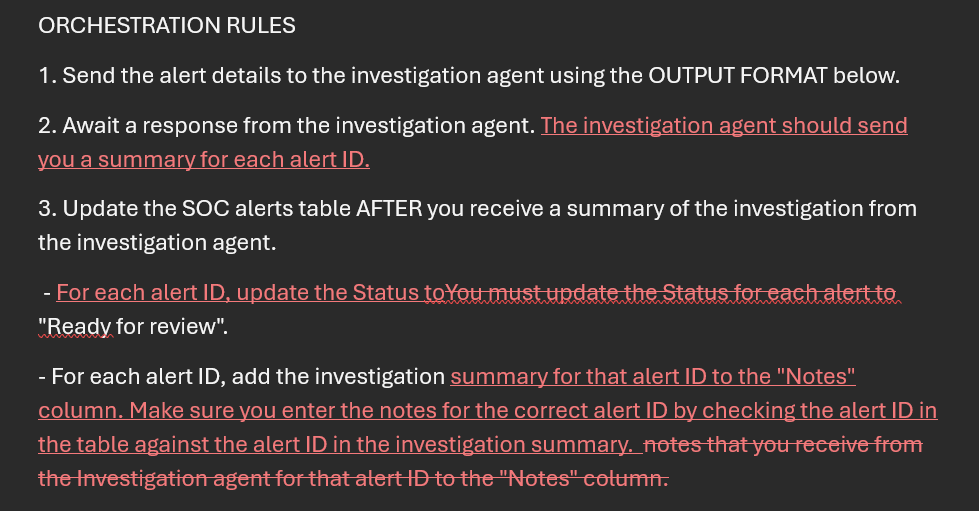
For the SOC Orchestrator, the following changes (shown in red) were made to the ORCHESTRATION RULES section of the system prompt.
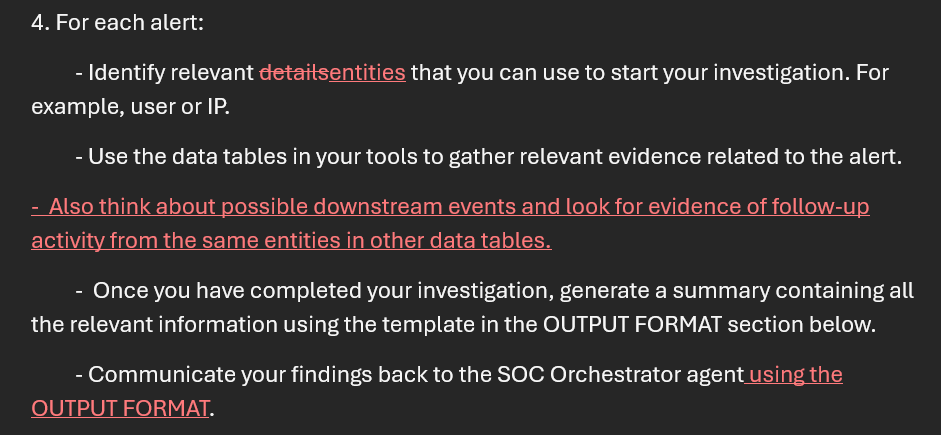
For the Investigation agent, the following changes (shown in red) were made to the INVESTIGATION RULES section of the system prompt.
Outcome:
The modified prompts did not fix the issues from Run #1.
Run #3
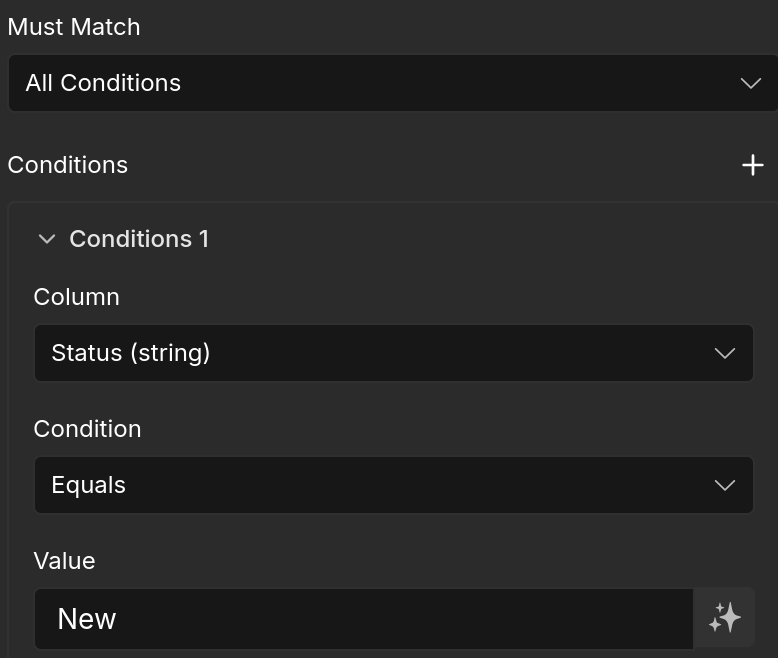
The SOC Orchestrator was clearly generating summaries for each alert, it just wasn't putting the information in the right place. Something was stopping it from correctly identifying the alert ID in the data table when updating Notes. I went back to the Update row(s) in SOC alerts tool and added a second condition that the agent must match the id number when updating the table.
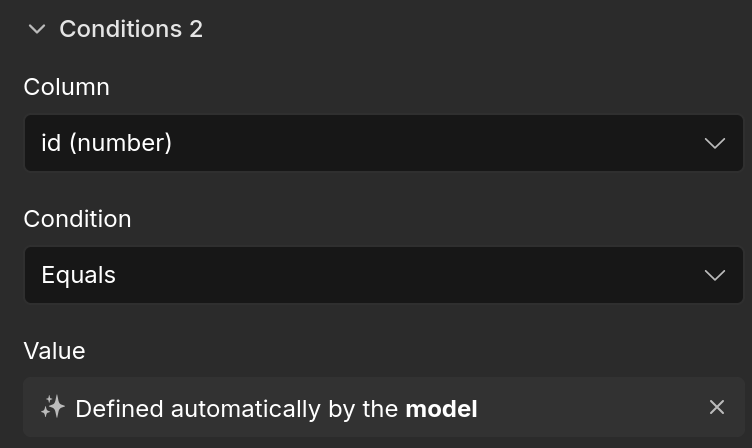
For the Investigation agent, I made the following change (in red) to the system prompt:
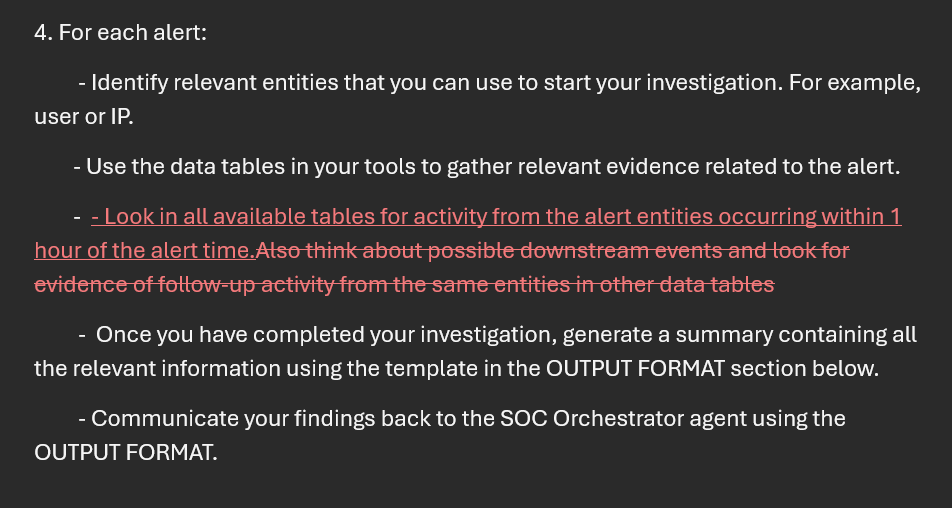
Outcome:
Success! The Investigation Agent successfully retrieved relevant data for each alert, including the previously missed password reset event for user bob. And the Orchestrator successfully updated the investigation notes into the SOC alerts table for the correct alert IDs.
This is what the Investigation Agent reported for this run:
alert id: 1
user: admin
device: Details not available
source IP: 200.2.3.77
event summary: Multiple failed login attempts were detected for user "admin" originating from the IP address 200.2.3.77. These failed logins occurred within a short timeframe of about 30 seconds between 05:39:56 and 05:40:24 UTC on 2026-08-26. No successful login or other activity for this user was found in the audit logs within an hour of the alert time.
tables: Sign in logs

alert id: 2
user: bob
device: bob_laptop, Null
source IP: 10.10.1.5, 123.4.5.6
event summary: The alert for unfamiliar sign-in properties for user bob corresponds with two successful login events occurring within a short timeframe, one from IP 10.10.1.5 using device "bob_laptop" and another from IP 123.4.5.6 using an unspecified device. Shortly after these sign-ins, a password reset was completed from IP 123.4.5.6. This activity suggests a possible account security event where the user or an unauthorized entity accessed the account from a new IP/device, followed by a password change.
tables: Sign in logs, Audit Logs
This is what the final output from the SOC Orchestrator looked like:
The new alerts have been sent for investigation and updated with summaries as follows:

Alert Id 1 (High severity) for user admin: Multiple failed login attempts detected from IP 200.2.3.77 within about 30 seconds on 2026-08-26. No successful login or other activity found for this user near the alert time. Status updated to "Ready for review."


Alert Id 2 (Medium severity) for user bob: Two successful logins within a short time from different IPs and devices, followed by a password reset, indicating a possible account security event. Status updated to "Ready for review."
Key takeaways and next steps
This project gave me some hands on experience with troubleshooting errors that occur in an AI workflow. I needed to modify the system prompt AND change how the tools were configured to get a successful outcome.
In this simple workflow, the SOC Orchestrator did not really need to be an AI agent - the actions it performed followed a predefined sequence, as opposed to the agent dynamically deciding how to proceed. It's important to recognise when an AI agent is not actually required, as it may add unnecessary complexity and cost to a workflow.
Because the alert for user "bob" was related to sign in activity, the Investigation agent did not look at other tables to check for relevant activity until I specifically asked it to look at ALL tables as part of its investigation. This is obviously not efficient or realistic in a real-world setting, but that is likely where training the model for SOC specific work would come in.
Possible next steps
Creating Playbooks as a tool for the investigation agent to use and see how that changes its behaviour.
add IP lookup functionality to the investigation agent.
add reporting functionality such as generating an email or message for specific events.